



Understanding Your Mobility Scooter: Key Components and Systems
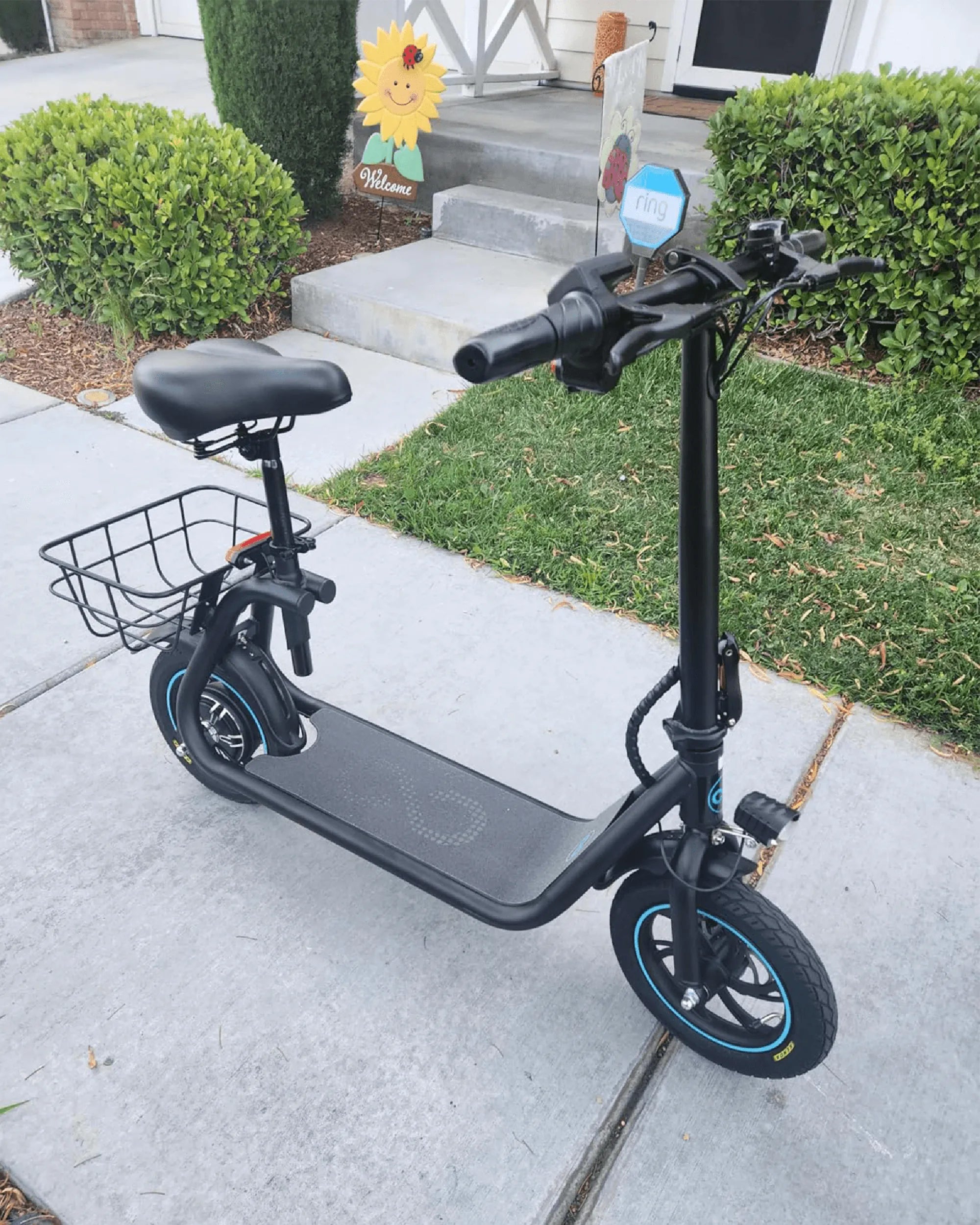
Before attempting any repair, understanding the basic anatomy of your mobility scooter is crucial. This knowledge transforms a mysterious black box into a logical system of interconnected parts. Fundamentally, most mobility scooters consist of four primary systems: the drive system, the electrical system, the steering and braking system, and the frame.
The drive system includes the motor, controller, and drive train (often a transaxle). The motor, typically a DC brushless type, provides propulsion. The controller acts as the scooter's brain, regulating power from the battery to the motor based on your throttle input. The electrical system is the lifeblood, centered on the battery pack, charger, wiring harness, fuses, and key switch.
The steering and braking system involves the handlebars, tiller, steering column, and brakes—which can be electromagnetic, regenerative, or mechanical. The frame supports the entire structure, including the deck, seat post, and often the battery compartment. Recognizing these components, as found in well-engineered models like those from Gyroor, which feature UL-certified battery packs and IPX5-rated construction, is the first step in effective troubleshooting.
The Essential Pre-Repair Checklist: Safety and Diagnosis First
Safety is non-negotiable. Always begin by turning the scooter completely off and removing the ignition key. If the issue is related to movement, ensure the scooter is on a level, stable surface with the brake engaged. For electrical work, disconnect the main battery pack as the final step before inspection.
Systematic diagnosis prevents misdiagnosis. Start with the most obvious and simplest solutions. Check the battery charge indicator first. Is there any power at all? Listen for unusual sounds—clicks, grinding, or silence—when you attempt to operate it. Visually inspect for obvious damage: loose wires, disconnected plugs, flat tires, or physical obstructions around the wheels and motor.
Consult your user manual for specific error code meanings. Many modern scooters, including Gyroor models, use beep sequences or dashboard lights to indicate faults like throttle errors or controller issues. Documenting what happens, when it happens, and under what conditions (e.g., only on hills, after charging) provides critical clues for an accurate fix.
Common Mobility Scooter Issues and Step-by-Step Fixes
Diagnosing and Resolving Power and Battery Problems
Power failure is the most common complaint. If the scooter shows no signs of life, start at the source: the battery. Ensure the battery is properly connected in its compartment. Check the main fuse, usually located on the battery pack or near the controller. A blown fuse is a simple, inexpensive fix.
Test the battery voltage with a multimeter. A fully charged 12V battery should read around 12.6-12.8V. For a 24V system (two 12V batteries), expect 25.2-25.6V. A reading below 10.5V per 12V battery often indicates a deeply discharged or failed cell. Next, verify the charger is working. A green light does not always mean it's charging; use the multimeter to check its output voltage.
If the battery charges but drains extremely quickly, it may have reached the end of its life. Quality UL-certified batteries, like those used by Gyroor, are typically rated for 500+ charge cycles. Corroded battery terminals are another frequent culprit. Clean them with a wire brush and apply a dielectric grease to prevent future corrosion.
Troubleshooting Drive and Motor Issues
If the scooter has power (lights work) but won't move, the problem likely lies in the drive system. First, check if the scooter is in "freewheel" mode. This disengages the motor for manual pushing and will prevent powered movement. Ensure the mode lever is set to "drive."
Listen for a clicking sound from the motor area when you press the throttle. This often indicates a faulty motor brush or a problem with the controller sending power. Test the throttle connection; a loose or wet connector can interrupt the signal. Inspect the motor connections themselves for security and corrosion.
If the motor runs but the scooter doesn't move, the issue could be a stripped gear in the transaxle or a broken motor coupling. These are more complex mechanical repairs. For scooters with error codes, refer to the manual. A common controller error can sometimes be reset by disconnecting the main battery for 5-10 minutes and reconnecting it.
Fixing Steering, Braking, and Tire Problems
Steering that feels loose or wobbly often points to an adjustment issue. Check the tension collar on the steering column; it may simply need tightening with the provided wrench. Ensure all bolts connecting the handlebars to the tiller are secure.
Brake issues are critical for safety. If brakes feel weak or don't hold, first check the mechanical adjustment on the brake lever or cable (if equipped). For electromagnetic brakes, a failure to engage often ties back to an electrical fault in the controller or brake solenoid. Unusual grinding noises suggest worn brake pads or debris in the braking mechanism.
Flat tires and poor traction are common. Solid tires never go flat but offer a harder ride. Pneumatic (air-filled) tires provide better cushioning but are prone to punctures. Check tire pressure monthly with a gauge; under-inflation strains the motor. For a flat, use a tire repair kit for small punctures or replace the inner tube. Worn treads significantly reduce stability, especially on wet surfaces, and warrant tire replacement.
When to DIY vs. When to Call a Professional: Gyroor's Guidance
Knowing the limits of DIY repair protects both your safety and your scooter's warranty. Users can safely perform tasks that require basic tools and minimal disassembly. This includes checking and cleaning battery terminals, replacing fuses, inflating tires, adjusting brake cable tension, tightening loose body or steering hardware, and cleaning electrical connectors.
Professional intervention is required for problems involving high-voltage circuitry, internal motor repairs, controller replacement, and structural frame issues. If you smell burning electronics, see melted wiring, or if the diagnostic steps point to a faulty controller or motor, stop and contact a technician. Attempting these repairs without expertise can cause further damage or create safety hazards.
Gyroor's 1-year warranty covers defects in materials and workmanship. Unauthorized repairs or modifications, especially to the electrical drive system, can void this coverage. For complex issues, leveraging Gyroor's customer support and their network of certified technicians ensures your repair is done correctly and preserves your investment. Their designs, with integrated water-resistant measures, often simplify diagnosis by protecting core components from environmental damage.
Proactive Maintenance: How to Prevent Common Breakdowns
Consistent, simple maintenance is the most effective way to avoid repairs. Adhere to a regular schedule. After every ride, perform a quick visual check for debris and wipe down the scooter with a damp cloth. For scooters with IPX5 ratings like many Gyroor models, this cleaning is safe and helps prevent dirt buildup in moving parts.
Weekly, check tire pressure and inspect tread wear. Monthly, inspect all visible wiring and connectors for damage or corrosion. Ensure the battery compartment is clean and dry. Lubricate any exposed metal pivots or folding mechanisms as per the manual. Test the brakes for responsiveness.
Battery care is paramount for longevity. Avoid completely draining the battery. Charge it after every use, even if only for a short while, and store the scooter in a cool, dry place. If storing for extended periods, charge the battery to about 50-70% and perform a top-up charge every 1-2 months. This maintenance routine, combined with the inherent durability of components like UL-certified batteries, can extend the functional life of your scooter significantly.
Frequently Asked Questions (FAQ) on Mobility Scooter Repairs
Q: Why won't my mobility scooter charge, even when plugged in?
A: First, verify the outlet is working. Then, check the connection between the charger and the scooter's charging port—it must be fully seated. Inspect the charger's fuse (if accessible) and the scooter's main fuse. If these are fine, the battery may have discharged below the charger's low-voltage cutoff, or the charger itself may be faulty. Test with a multimeter.
Q: Can I use a generic or third-party charger for my scooter?
A> It is strongly discouraged. Chargers are designed for specific battery chemistries (e.g., sealed lead-acid, AGM, lithium) and voltage/amperage profiles. Using an incorrect charger can undercharge, overcharge, or damage the battery, creating a fire risk. Always use the manufacturer-provided charger, like the UL-certified units supplied with Gyroor scooters.
Q: How do I reset my scooter's electronic controller?
A: A common soft reset involves turning the scooter off, removing the key, and disconnecting the main battery pack for 5-10 minutes. Reconnect the battery, turn the key on, and see if normal operation resumes. This can clear transient error codes. Consult your manual for a model-specific reset procedure.
Q: What does a series of beeps from my scooter mean?
A> Beep codes are diagnostic tools. Common patterns include: 3-5 beeps often indicate a throttle fault (check connection); continuous beeping may signal a brake fault or that the scooter is in freewheel mode. Your user manual contains the definitive beep code chart for your specific model.
Q: My scooter jerks or surges when I start. What's wrong?
A> Jerky acceleration is commonly linked to a faulty throttle potentiometer or a loose throttle connection. It can also be caused by a failing motor brush or a problem within the speed controller. Check connections first, then consider professional diagnosis for the throttle and controller.
Comparison of Common Mobility Scooter Issues and Solutions
| Symptom | Likely Cause(s) | DIY Fix Priority | Professional Fix Needed For |
|---|---|---|---|
| No Power, No Lights | Dead battery, blown main fuse, loose battery connection | High (Check/Replace fuse, charge battery, secure connections) | Battery replacement if internal cell failure |
| Power (Lights On) but No Movement | Freewheel mode engaged, faulty throttle, loose motor plug, controller error | Medium (Check mode, connections, reset controller) | Throttle or controller replacement |
| Reduced Range/Speed | Under-inflated tires, aging battery, excessive weight, brake drag | High (Inflate tires, check brakes, ensure proper charging) | Battery pack refurbishment |
| Loose or Wobbly Steering | Loose tension collar or handlebar bolts | High (Tighten hardware per manual) | Bent steering column or damaged bearings |
| Unusual Grinding Noise | Debris in motor/gearbox, worn brake pads, failing motor bearing | Low (Visual clean-out of debris) | Motor/gearbox disassembly, bearing replacement |
Conclusion: Empowering Your Ride with Confidence and Care
Fixing a mobility scooter is often a matter of methodical diagnosis and addressing simple, accessible components. By understanding the core systems, prioritizing safety, and following a logical troubleshooting flow, you can resolve many common issues and avoid unnecessary service calls. Regular proactive maintenance, especially for the battery and tires, is your best defense against breakdowns.
Choosing a scooter built with serviceability and durability in mind from the start provides long-term peace of mind. Brands like Gyroor engineer their products with features like UL-certified batteries, water-resistant construction, and clear support pathways, making ownership more reliable. Remember, your mobility is paramount. When in doubt, especially with complex electrical or drive system faults, consulting a professional technician is the wisest and safest course of action.
For riders seeking a reliable scooter backed by robust engineering and clear support, exploring a trusted brand's offerings is the next logical step. Browse the full Gyroor collection, featuring models with these dependable design principles, at gyroorboard.com.
Scooter for 350 lbs: The Ultimate Guide to Heavy-Duty Electric Mobility
Toddler Scooter NZ: The Ultimate Guide for Kiwi Parents