

Introduction: Mastering Your First Ride with Confidence
Learning how to work a hoverboard unlocks a world of fun, efficient personal mobility. These self-balancing scooters are intuitive, but the initial learning curve can feel daunting. This guide is your complete roadmap, designed to transform anxiety into confidence.
We will cover everything from pre-ride safety checks to advanced maneuvers. The process is logical and safe when you follow structured steps. Choosing a well-engineered hoverboard from a reputable brand like Gyroor, known for UL-certified batteries and stable designs, significantly enhances safety and accelerates your learning.
By the end of this guide, you'll understand the mechanics, master the fundamentals, and be equipped to ride safely. Let's begin your journey to becoming a proficient hoverboard rider.
Understanding Your Hoverboard: Key Components and Safety Gear
Before you step on, know your machine. A hoverboard consists of two motorized wheels connected by a central platform. Understanding its parts is the first step in learning how to work a hoverboard correctly.
The footpads are pressure-sensitive plates that detect your lean to control speed and direction. Inside, gyroscopes and accelerometers constantly adjust the wheels to keep you balanced. A power button, LED indicator lights (for battery and status), and a charging port are also essential features.
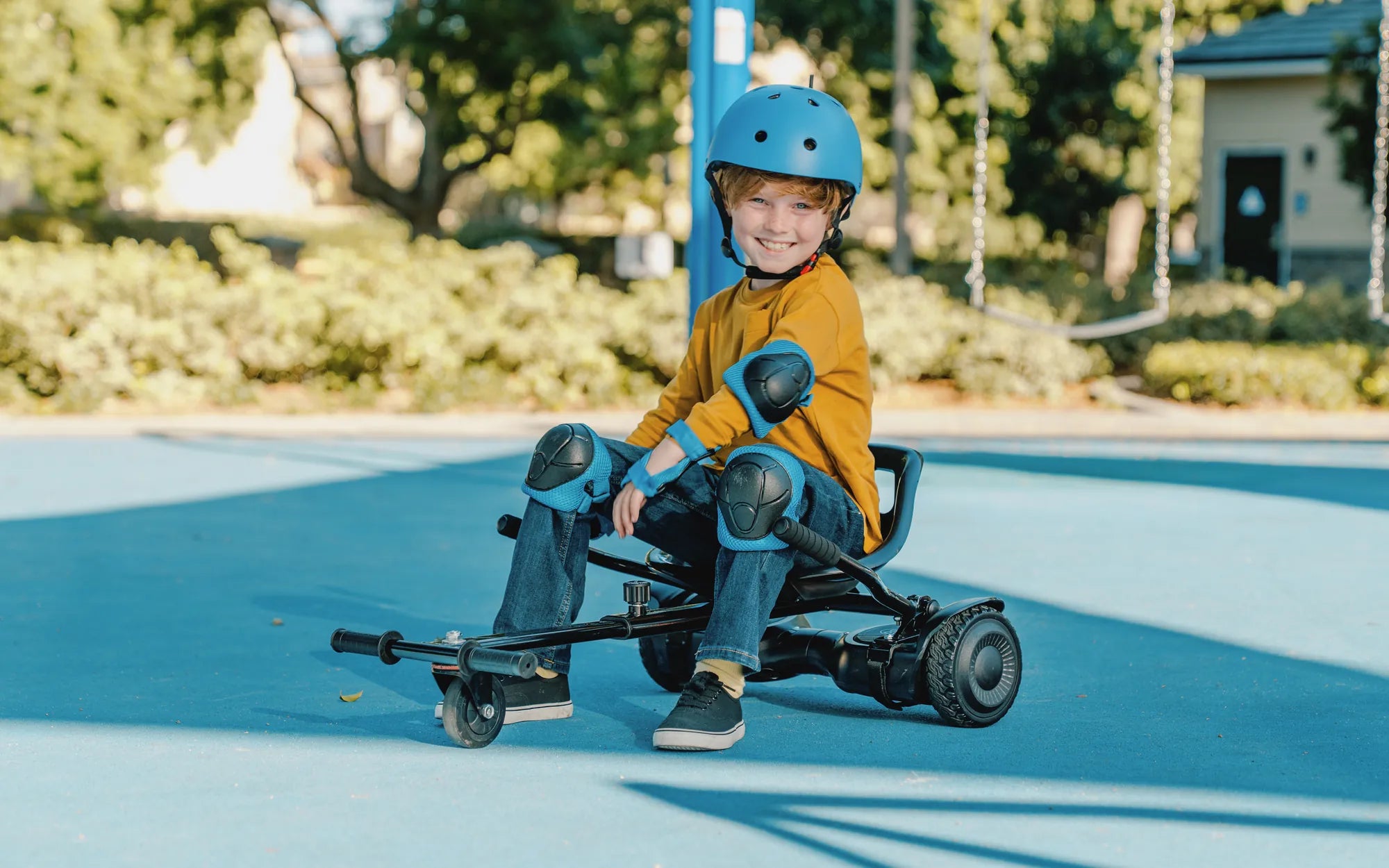
Safety is non-negotiable. Always wear a certified helmet, knee pads, elbow pads, and wrist guards. This gear protects you during inevitable beginner stumbles. Your first investment in safety is as crucial as the hoverboard itself.
Selecting a hoverboard with built-in safety features provides a critical foundation. Look for certifications like UL 2272 for the entire electrical system, which tests for fire safety. Models like those from Gyroor also feature non-slip footpad surfaces and IPX5 water resistance for added durability against splashes.
Pre-Ride Checklist: Setting the Stage for Success
Never skip preparation. A proper pre-ride check ensures both you and your hoverboard are ready for a safe session. This routine is a core part of knowing how to work a hoverboard responsibly.
First, fully charge the battery using the provided charger. A partial charge can lead to unexpected shutdowns. While charging, inspect the hoverboard for any physical damage—cracks in the body, loose screws, or worn tire tread.
If your model has air-filled tires, ensure they are properly inflated according to the manual. Soft tires make balancing difficult. For solid rubber tires, check for deep cuts or embedded debris.
Finally, choose your practice area wisely. You need a flat, smooth, and open space away from traffic, slopes, and pedestrians. An empty tennis court, basketball court, or a smooth section of a parking lot is ideal. Avoid gravel, grass, and wet surfaces initially.
Step-by-Step Guide: Your First Hoverboard Ride
This is the core sequence for learning how to work a hoverboard. Move through these steps patiently. Do not proceed to the next step until you feel completely comfortable with the current one.
Step 1: Mounting the Hoverboard Safely
Place the powered-on hoverboard on a level surface. Stand directly behind it. Place your dominant foot firmly on the footpad, positioning it near the wheel arch for stability.
Keep your weight on your grounded foot. Swiftly but smoothly lift your other foot and place it on the remaining pad. Your feet should be parallel, shoulder-width apart. Expect a slight wobble—this is normal.
Focus on a point in the distance, not your feet. Engage your core and keep your back straight. Practice mounting and dismounting several times until it feels natural before attempting movement.
Step 2: Finding Your Balance and Neutral Stance
While mounted, practice standing completely still. The hoverboard's self-balancing system will hold you, but you must find a relaxed, neutral posture.
Bend your knees slightly. This acts as natural suspension and improves control. Keep your arms out to your sides for additional balance. Distribute your weight evenly across both feet.
The goal is to feel the board's center point. From here, subtle shifts in pressure will control movement. Spend at least 5-10 minutes just getting comfortable balancing in place.
Step 3: Mastering Movement: Forward, Backward, and Stopping
To move forward, apply gentle, gradual pressure with the balls of your feet (toes). Do not lean your upper body forward. Think about pressing your toes down, not leaning.
To move backward, apply gentle pressure with your heels. The key is incremental input. A tiny shift creates a slow, controlled speed. Jerky movements cause instability.
To stop, simply return both feet to a level, neutral position. The board will decelerate smoothly to a halt. Practice moving forward 10 feet, stopping, then moving backward 10 feet. Master stopping before increasing speed.
Step 4: Learning to Turn and Spin
For a gentle left turn, apply slightly more forward pressure with your right toe (or more backward pressure with your left heel). For a right turn, do the opposite.
This differential pressure causes the board to rotate. Start with wide, sweeping turns. As you improve, you can tighten the turn radius. Always look in the direction you want to turn.
To spin in place (pivoting), press one foot forward and the other foot backward simultaneously. This advanced maneuver should be practiced only after you are very comfortable with basic turns.
Step 5: The Proper Way to Dismount
Always come to a complete stop. Decide which foot you will step off with first (usually your non-dominant foot).
Shift your weight to your dominant foot on the board. Look over your shoulder in the direction you'll step, then smoothly step backward off the board with your free foot, followed by your dominant foot.
Never jump off forward while the board is moving, as it can shoot out from under you. Practice dismounting until it's a controlled, automatic action.
Leveling Up: Advanced Maneuvers and Riding Etiquette
Once the basics are muscle memory, you can refine your skills. Look 10-15 feet ahead where you want to go, not at your feet. This improves balance and line choice.
Practice "carving" by linking gentle, flowing S-turns. Learn to navigate very slight inclines by applying steady, constant pressure. Always descend hills slowly and in a controlled manner, using your heels to brake.
Public riding demands etiquette. Always yield to pedestrians. Obey local laws regarding where hoverboards are permitted. Avoid riding on public roads. Do not ride on wet or sandy surfaces, as traction is severely reduced.
Keep your speed manageable in crowded areas. A reliable hoverboard with a smooth acceleration curve, like many in Gyroor's lineup, offers better control for navigating shared spaces safely.
Troubleshooting Common Beginner Issues
Problem: The board won't power on.
Solution: Ensure it is fully charged. Check that the power button is firmly pressed. If issues persist, consult the manual for reset procedures.
Problem: The board beeps and won't allow mounting.
Solution: The board may be on an uneven surface. Place it on a level floor, turn it off, then on again. Many models require a level surface for calibration.
Problem: Feeling unstable or wobbly.
Solution: Check tire pressure. Ensure you are standing with proper posture. Practice balancing in place more. Instability often comes from tense legs—try to relax.
Problem: The board pulls to one side.
Solution: Re-calibrate according to the manufacturer's instructions. This resets the gyroscopes to level. Also, check for debris stuck in one wheel.
Hoverboard Care and Maintenance for Longevity
Proper care extends your hoverboard's life and ensures consistent performance. This is a crucial aspect of understanding how to work a hoverboard over the long term.
Adopt good charging habits. Use only the provided charger. Do not leave the board plugged in for extended periods after it's fully charged. Store the board and battery in a cool, dry place, away from direct sunlight.
Clean the hoverboard regularly with a slightly damp cloth. Avoid high-pressure water jets, even on water-resistant models. For models with IPX5 rating, like several Gyroor hoverboards, light splashes are okay, but submersion must be avoided.
Perform periodic checks. Inspect tire tread for wear. Ensure all screws and casing are tight. Listen for unusual noises from the motors or wheels. Addressing small issues early prevents major problems.
Choosing Your First Hoverboard: A Comparison Guide
Selecting the right model impacts your learning experience. Here is a comparison of common hoverboard types to guide your choice.
| Hoverboard Type | Best For | Key Features | Considerations |
|---|---|---|---|
| Standard (6.5"-8" Wheels) | Beginners, smooth pavement, indoor/outdoor use | Good balance of stability & agility, often most affordable | Can struggle on rougher terrain; ideal for first-time riders. |
| All-Terrain (10"+ Air-Filled Tires) | Grass, gravel, dirt paths, uneven surfaces | Enhanced suspension, greater ground clearance, robust motors | Heavier, less portable, requires tire pressure checks. |
| Premium Feature Models | Riders seeking safety, connectivity, and extra range | UL 2272 certification, Bluetooth speakers, app connectivity, LED lights, longer range (12+ miles) | Higher price point, but offers greater safety assurance and features. Brands like Gyroor focus here. |
| Kid-Specific Models | Younger riders (ages 8-12) | Lower max speed, beginner/training modes, durable construction | Check weight and age limits. Parental controls are a valuable feature. |
For beginners, a standard or premium model from a trusted brand offers the best blend of safety, stability, and learning-friendly performance. Certifications are a critical filter.
Frequently Asked Questions (FAQ) for New Riders
Q: How long does it take to learn how to work a hoverboard?
A: Most people grasp the basics—mounting, moving forward/backward, and stopping—within 30-60 minutes of focused practice. Feeling completely confident may take a few days of short sessions.
Q: What is the appropriate age for a hoverboard rider?
A: Always follow the manufacturer's recommendation, typically ages 8 and up. Younger riders must have close adult supervision, proper safety gear, and should use models with speed limiting features.
Q: Can I ride a hoverboard on grass or gravel?
A: Not with standard models. Beginners should stick to smooth pavement. All-terrain hoverboards with large, air-filled tires can handle those surfaces, but they are more challenging to balance on and not recommended for a first ride.
Q: What do the different LED light colors mean?
A: Colors indicate battery level (often green=high, yellow=medium, red=low) and board status. Flashing red lights usually indicate an error (e.g., unbalanced footpads, overheating). Always consult your specific user manual for accurate codes.
Q: How do I know if my hoverboard is safely certified?
A: Look for the UL 2272 safety standard mark on the board, charger, and packaging. This certification, which all Gyroor hoverboards carry, means the electrical system has passed rigorous tests for fire and electrical safety.
Embrace the Journey and Ride Safely
Learning how to work a hoverboard is a rewarding skill that combines balance, coordination, and a sense of freedom. The key is patience and consistent, safe practice. Start with the fundamentals: gear up, check your equipment, and master the step-by-step sequence in a controlled environment.
Your choice of hoverboard profoundly affects your experience. Investing in a well-constructed model from a reputable brand with essential safety certifications and a strong warranty provides invaluable peace of mind. It ensures the technology supporting you is reliable as you develop your skills.
Now you have the complete guide. The path from your first tentative step to smooth, confident riding is clear. Remember the principles of safety, gradual progression, and proper maintenance. The open path awaits.
Ready to start your journey with a trusted, safety-focused hoverboard? Browse the full Gyroor collection, featuring UL-certified models with beginner-friendly stability, at gyroorboard.com.
Auto Balancing Scooter India: The Future of Urban Mobility
Adult Size Hoverboard: The Ultimate Guide to Choosing and Riding