

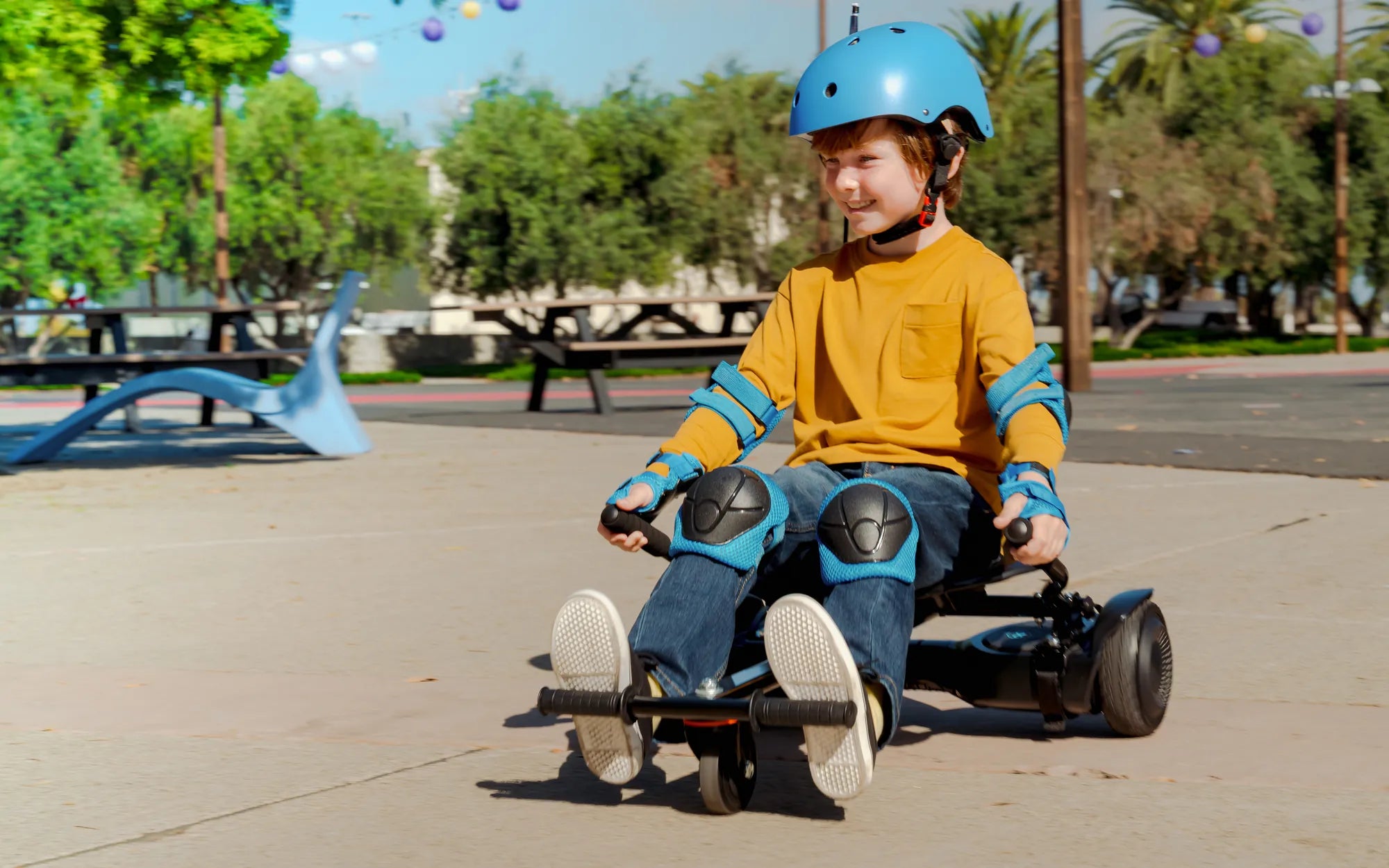
Introduction to Kids' Hoverboards with Lights
Choosing the right hoverboard for kids with lights involves balancing excitement with essential safety. These self-balancing scooters have evolved from simple transportation to feature-packed toys that captivate children's imaginations. The integration of LED lighting systems transforms the riding experience, offering both enhanced visibility and a dynamic, personalized style.
This guide serves as your definitive resource for navigating the market. We will dissect the crucial safety standards that are non-negotiable for any children's model. You'll learn how to match specifications to your child's age and skill level, ensuring a perfect fit.
Beyond the purchase, we provide a complete protocol for safe riding. From mandatory protective gear to a structured learning curriculum, our goal is to build confidence and competence. Proper maintenance routines will also be covered to guarantee the hoverboard remains a source of joy for years.
Ultimately, a well-chosen hoverboard with lights encourages outdoor activity, develops coordination, and provides immense fun. Let's explore how to make that happen safely and smartly, turning every ride into a highlight of your child's day.
Why Lights are More Than Just a Cool Feature
The LED lights on modern hoverboards serve a dual purpose that extends far beyond aesthetics. Primarily, they are a critical safety component, significantly increasing the rider's visibility to pedestrians, cyclists, and drivers. This is especially important during dawn, dusk, or in shaded areas where a small rider on a low-profile device can be difficult to see.
Functionally, lights act as running lights and signal indicators. Many models feature different colored lights on the front and rear, or directional lighting patterns that change with movement. This visual feedback helps others anticipate the rider's actions, creating a safer shared environment in driveways, parks, and on sidewalks.
On the engagement side, customizable light shows are a powerful motivator for outdoor play. Children love personalizing their ride with color modes, patterns, and rhythmic flashes that sync to music. This element of self-expression and cool factor directly contributes to the hoverboard's appeal, encouraging more frequent use and physical activity.
From a parental perspective, lights also allow for easier supervision. You can keep track of your child from a distance, even as daylight fades. When evaluating a hoverboard for kids with lights, consider the lighting system's brightness, pattern variety, and whether it includes practical front and rear illumination, not just decorative wheel lights.
Safety First: The Non-Negotiable Features for Kids
Before any light show is considered, certain foundational safety features are mandatory. The absolute foremost is UL 2272 certification. This standard, developed by Underwriters Laboratories, rigorously tests the electrical system and battery pack for fire and electrical safety. Never purchase a hoverboard without this certification; it is the primary defense against the thermal runaway incidents seen in early, uncertified models.
The battery itself must be housed in a robust, impact-resistant casing. Look for brands that use high-quality, UL-certified battery cells known for stability. The battery management system (BMS) should protect against overcharging, short-circuiting, and overheating. These are not visible features but are the most critical components for safe operation.
The physical design must prioritize stability and control. Large, textured, non-slip foot pads are essential for maintaining a secure footing. The board should have a balanced weight distribution and a low center of gravity to prevent tipping. For beginners, models with a "learning mode" or speed limiter are invaluable, allowing the child to master balance at a reduced, safer speed before accessing full power.
Finally, check the wheel construction and motor power. Solid rubber or air-filled tires provide better shock absorption on uneven surfaces. Dual motors of adequate power (typically 250W each) ensure smooth acceleration and reliable performance on slight inclines, preventing the board from stuttering or losing power unexpectedly, which could lead to a fall.
Choosing the Right Hoverboard: A Parent's Buying Checklist
Navigating the specifications and marketing claims requires a systematic approach. Start by setting a budget that reflects the importance of quality and safety. Extremely low-priced models often compromise on the very components—battery, motors, certifications—that ensure safe operation. Investing in a reputable brand is an investment in your child's safety.
Next, scrutinize the product specifications against your child's profile. The maximum weight limit is not a target; the child's weight should be comfortably within the limit with room for growth. Consider the hoverboard's own weight; a heavier board may be more stable but harder for a younger child to carry. The range per charge should align with your child's typical usage patterns to avoid frustration.
Examine the build quality through product images and reviews. Look for solid construction, clean wiring, and durable shell materials. Check the warranty terms—a confident brand will offer at least a one-year warranty on the core components. Customer service accessibility is also a key factor should you need support.
Finally, read independent and verified customer reviews. Pay particular attention to comments about real-world battery life, durability after minor bumps, and the responsiveness of the company's customer service. This qualitative data is often more revealing than the listed specifications alone.
Age, Weight, and Speed Considerations
Matching the device to the child's physical development is paramount. Most manufacturers recommend hoverboards for children aged 8 and above, as this is typically when kids have developed the necessary core strength, balance, and coordination. However, a mature 6 or 7-year-old with good motor skills can start with a strictly speed-limited model under direct supervision.
The weight limit is a critical engineering specification. Exceeding it can strain the motors, drain the battery rapidly, and compromise the structural integrity of the board. A common range for kids' models is 44 to 176 pounds. Always choose a board where your child's weight is at least 20-30 pounds below the maximum limit for optimal performance and longevity.
Speed settings are your best tool for managing risk. Beginner models or those with app connectivity often allow you to cap the maximum speed, usually between 4-7 mph for learning. As skill improves, this can be increased to a typical max of 9-10 mph for kids' models. Avoid boards that only operate at high speeds; controllable progression is key to safe skill development for a hoverboard for kids with lights.
Consider the child's temperament alongside physical size. A cautious child may thrive with a standard model, while an adventurous one might benefit from a model with more pronounced safety features like a very stable wheelbase and responsive, gentle acceleration curves. The goal is to build confidence without encouraging recklessness.
Build Quality, Warranty, and Brand Trust
The longevity and safety of the hoverboard are directly tied to its construction. A high-quality shell is made from reinforced ABS plastic that can withstand the inevitable bumps and scrapes of learning. Seams should be tight to prevent water and dust ingress, with a clear IP (Ingress Protection) rating for water resistance, such as IPX4 or higher.
The internal components must be securely mounted to prevent rattling or disconnection. High-grade wiring, soldered connections, and proper insulation are hallmarks of quality manufacturing. These are not visible but are revealed through consistent performance and the absence of electrical issues over time.
A strong warranty is a proxy for brand confidence. It signals that the manufacturer stands behind the quality of their materials and assembly. Look for at least a 1-year warranty that covers defects in workmanship and materials. Some leading brands extend this to 2 years or offer specific guarantees on the battery pack.
Brands like Gyroor exemplify this trust-based approach. With a focus on UL-certified battery packs tested for over 500 charge cycles, IPX5 water-resistant designs, and a reliable 1-year warranty, they build devices that meet rigorous safety and durability standards. This has earned them the trust of over 100,000 riders across North America and Europe, with consistently high customer ratings reflecting their commitment to quality.
Top Hoverboard Models with Lights for 2024
The market offers a range of hoverboard for kids with lights options, from value-oriented starters to feature-rich premium models. When curating this list, we prioritized verified safety certifications, robust lighting systems, positive user feedback, and overall value. The right choice depends on your specific balance of budget, desired features, and performance needs.
Entry-level models provide core functionality with basic LED wheel lights and essential safety features like UL 2272 certification. They are perfect for younger first-time riders where the primary goal is learning balance and control in a safe, speed-limited environment. Battery range and top speed are typically modest but adequate for neighborhood use.
Mid-range hoverboards expand on this with brighter, more customizable RGB light systems, often including underglow and Bluetooth speaker connectivity. They usually feature more powerful dual motors for better hill-climbing ability and longer range. Build quality and wheel size often see noticeable improvements in this tier, enhancing ride comfort on varied surfaces.
Premium models represent the pinnacle of kids' hoverboard design. They integrate advanced lighting with multicolor zones and dynamic patterns, superior range from high-capacity batteries, and often include smart features via a companion app. These apps may allow for speed limiting, light pattern customization, and ride tracking. This tier is for the serious young enthusiast or for parents seeking the most durable, full-featured option.
Comparison Table: Features at a Glance
| Model / Feature | Light System | Max Speed | Range | Max Weight | Key Safety Features | Price Tier |
|---|---|---|---|---|---|---|
| Starter Light Rider | Single-color wheel LEDs | 7 mph (Learn Mode: 4 mph) | 6 miles | 120 lbs | UL 2272, Beginner Mode, Non-Slip Pads | Budget |
| Neo Glow Pro | RGB Wheel & Underglow, 4 Patterns | 9.5 mph | 9 miles | 160 lbs | UL 2272, IPX4, App Speed Control | Mid-Range |
| Gyroor Warrior (Premium Pick) | Full RGB Spectrum, Customizable Zones, Front/Back Safety Lights | 10 mph (App-Limited) | 12 miles | 220 lbs | UL 2272 Certified Battery, IPX5, 1-Year Warranty, Learning Mode | Premium |
The table above provides a snapshot of the market segmentation. The Gyroor Warrior stands out as a premium pick due to its comprehensive approach. It combines a sophisticated, safety-oriented lighting system (with dedicated front and rear lights) with a high-weight capacity and the peace of mind of an IPX5 water-resistance rating and a trusted brand warranty. Its app connectivity allows parents to manage the experience actively, making it a top choice for safety-conscious families seeking a full-featured hoverboard for kids with lights.
The Essential Pre-Ride Safety & Setup Protocol
Before the first thrilling ride, a meticulous setup and safety check is non-negotiable. Begin by unboxing the hoverboard in a spacious area and inspecting it for any shipping damage. Charge the battery fully using only the provided charger and a wall outlet, not a power strip, for the initial charge. Read the user manual thoroughly—familiarize yourself with the power button, indicator lights, and any specific calibration procedures.
Next, establish a family safety contract. Set clear, non-negotiable rules: always wear protective gear, never ride near roads or traffic, avoid wet surfaces and steep hills, and maintain a safe distance from obstacles and people. Define approved riding zones and times, such as daylight hours in the driveway or a specific park. Consistency in enforcing these rules is crucial.
Conduct a pre-ride inspection every time. Check tire pressure (if applicable) for proper inflation. Ensure all lights are functioning correctly. Listen for any unusual sounds from the motors or internal components. Verify that the foot pads are clean and dry. This 30-second ritual instills responsibility in the rider and catches potential issues early.
Finally, ensure the hoverboard is placed on a flat, level surface before powering on. Most models require a level surface for proper gyroscope calibration. Turning it on while tilted or held can cause it to behave erratically. This simple step ensures the self-balancing system initializes correctly, providing a stable and predictable platform for the rider.
Gear Up! Mandatory Protective Equipment
A helmet is an absolute, non-negotiable requirement for every single ride. Choose a multi-impact helmet certified for skateboarding or cycling (CPSC or ASTM F1492 standards). It must fit snugly without rocking and sit level on the head, covering the forehead. Let your child choose the design to encourage willingness to wear it.
Wrist guards are arguably the second most important piece of gear. When falling, the instinct is to put hands out, making wrists highly vulnerable to sprains or fractures. Quality wrist guards with hard plastic splints on the palm and back can prevent these common injuries. They are a small investment that pays significant dividends in safety.
Knee and elbow pads complete the essential kit. Look for pads with hard plastic caps, comfortable flexible surrounds, and secure straps. Properly fitted pads will stay in place during a fall, protecting the joints from painful abrasions and impact injuries. For beginners, full protective gear dramatically reduces the fear of falling, allowing them to focus on learning balance.
Consider high-visibility clothing or reflective vest strips, especially if riding in lower-light conditions where the hoverboard's lights are active. Closed-toe shoes with flat, grippy soles (like skate shoes) are also mandatory—no sandals, crocs, or bare feet. This head-to-toe approach transforms a potentially hazardous activity into a managed-risk sport.
Finding the Perfect Practice Zone
The ideal learning environment is a smooth, flat, and paved surface with plenty of open space. An empty tennis or basketball court, a school playground on the weekend, or a clean, level driveway are perfect candidates. The surface must be dry, as moisture can damage the electronics and cause the tires to lose traction.
The area should be free of major obstacles like rocks, sticks, or significant cracks in the pavement. It should also be a low-traffic zone, away from cars, bicycles, and pedestrian thoroughfares. This minimizes distractions for the learner and eliminates the risk of collision with others.
Avoid areas with slopes or inclines during the initial learning phase. Even a gentle slope can cause the board to accelerate or decelerate unexpectedly, challenging a beginner's balance. Once fundamental skills are mastered, gentle slopes can be introduced under supervision to teach controlled descent and ascent.
Good lighting is important, even for daytime practice, to ensure clear visibility of the ground surface. For practice sessions using the hoverboard for kids with lights in the evening, ensure the area is well-lit by streetlights or other ambient light, so the rider can still see pavement irregularities, not just be seen by others.
Mastering the Ride: A Step-by-Step Learning Guide for Kids
Learning to ride a hoverboard is a process of building muscle memory and confidence. It should be broken down into discrete, manageable stages. Never rush the child; some may master it in an hour, while others may need several short sessions over a few days. The role of the parent is to provide physical support initially and constant verbal encouragement throughout.
Start with the hoverboard powered off. Let the child step onto it, holding your hands or a stable railing, to simply feel the size and stance. Practice stepping on and off backwards, which is the safest dismount method. This removes the fear of the unknown before the device is even moving.
Once comfortable with the mounting position, power on the board while it is on a level surface. Hold the child's hands firmly as they mount. The initial goal is not to go anywhere, but simply to find the "sweet spot" of balance where the board remains still and beeps to indicate it is level. This teaches the core balancing point.
Celebrate small victories. The first successful mount, the first few seconds of unaided balance, the first controlled forward movement—each is a milestone. Positive reinforcement makes the learning process enjoyable and something the child wants to continue, turning practice into play.
Mounting, Dismounting, and Basic Balance
Mounting safely is the first critical skill. Position the hoverboard next to a wall, fence, or have a parent act as a stable support. The child should place their dominant foot firmly on the footpad, as close to the wheel as possible for stability. Keeping their weight on this grounded foot, they then swiftly but smoothly step up with the second foot.
Once both feet are on, the child should look forward, not down at their feet. A slight bend in the knees helps with balance. The goal is to find the neutral position where the board is not trying to move. Have them practice micro-adjustments—leaning slightly forward and back to see how the board responds while still holding support.
Dismounting is just as important. The safest method is to step off backwards, one foot at a time. The child should shift their weight to their dominant foot, then step straight back with the other foot onto the ground, followed by the dominant foot. Stepping forward can cause the board to shoot out from under them.
Practice mounting and dismounting repeatedly until it becomes a fluid, confident motion. Mastery of this fundamental eliminates the panic of getting on or off a moving board and provides a safe "exit strategy" if the child feels unstable at any time during riding.
Controlling Movement and Simple Maneuvers
Forward and backward movement is controlled by subtle shifts in weight. To move forward, the child leans pressure onto their toes; to move backward, pressure onto their heels. The key is to lean with the ankles and lower legs, not by bending at the waist, which throws off balance. Start with tiny, deliberate movements.
Turning is achieved by differential pressure. To turn right, apply gentle forward pressure with the left toe (or back pressure with the right heel). The board will pivot. The sharper the pressure differential, the tighter the turn. Begin with wide, sweeping turns in a large, open space before attempting tighter maneuvers.
Practice stopping smoothly. The board stops when the rider returns to a perfectly level stance. Teach the child to anticipate stops and gently level their feet. Sudden jumps or shifts to level out will cause jerky stops. Controlled, predictable stopping is a hallmark of a proficient rider.
Once these basics are solid, create simple courses using chalk or cones. Practice figure-eights, weaving, and controlled stops at a line. This builds practical skills in a fun, game-like setting. Remember, proficiency on a hoverboard for kids with lights comes from gradual progression, not immediate speed.
Maintenance and Care for Long-Lasting Fun
Proper maintenance ensures the hoverboard remains safe, reliable, and fun for its entire lifespan. Establish a simple weekly check-up routine that the child can participate in, teaching responsibility for their belongings. This routine should take no more than five minutes but can prevent major issues.
Always store the hoverboard in a cool, dry place away from direct sunlight and extreme temperatures. Do not leave it in a car trunk on a hot day, as excessive heat can degrade the battery. Store it with a partial charge (around 50-70%) if it will not be used for several weeks to maintain battery health.
Keep the charging port clean and free of debris. Use only the manufacturer-provided charger. While convenient, avoid using generic or third-party chargers, as their voltage and amperage output may not be perfectly matched to the board's battery management system, potentially causing slow damage over time.
Regularly check the manufacturer's website or app for any firmware updates. These updates can improve performance, safety algorithms, and battery management. A well-maintained hoverboard is not just a toy; it's a personal electric vehicle that benefits from attentive care.
Battery Charging and Storage Best Practices
The lithium-ion battery is the heart of the hoverboard. To maximize its lifespan (typically 500+ charge cycles for quality cells), avoid letting it fully discharge. Get in the habit of charging it after it drops below 20-30% charge. Conversely, do not leave it plugged in continuously for days after it reaches 100%.
A full charge usually takes 2-4 hours. Do not charge the board immediately after a long, strenuous ride when the battery is warm. Let it cool to room temperature first. Never charge the board unattended overnight or while you are away from home, as a precaution, even with UL-certified batteries.
If storing the hoverboard for a month or longer, charge (or discharge) it to approximately 50-60% before storing. Check this storage charge level every two months and give it a top-up back to 50-60% if needed. Long-term storage at full charge or zero charge can permanently reduce battery capacity.
Watch for warning signs of battery issues: significantly reduced range, the board not holding a charge, excessive heat from the battery compartment during charging or use, or swelling of the casing. If any of these occur, stop using and charging the device immediately and contact the manufacturer. This is where a strong warranty from a brand like Gyroor proves its value.
Regular Inspection and Cleaning
Perform a visual and functional inspection before each riding session. Check that all LED lights are working in their various modes. Ensure the power button and any other controls are responsive. Listen for any new grinding, clicking, or whining sounds from the wheel hubs when spinning the wheels by hand (powered off).
Inspect the tires for wear, cuts, or embedded debris. For air-filled tires, maintain the recommended PSI for a smooth ride and optimal battery efficiency. Check the foot pads for excessive wear, tears, or loss of their non-slip texture. Ensure all screws on the body are tight and the shell has no new, significant cracks.
Cleaning should be done with a damp (not wet) cloth to wipe down the body and foot pads. Never spray the hoverboard with a hose or pressure washer, and do not submerge any part of it. Even with an IPX5 rating, directed high-pressure water can force its way into seams. For stubborn dirt on wheels, use a soft brush.
Keep the wheel axles and charging port free of mud, sand, and grass clippings. A can of compressed air can be useful for gently blowing debris out of these small crevices. A clean hoverboard not only looks better but is less likely to suffer from debris interfering with moving parts or electrical contacts.
Frequently Asked Questions (FAQs)
Q: What is the best age for a child to start using a hoverboard?
A: Most manufacturers recommend ages 8 and up, as children typically have the required balance, coordination, and judgment at this stage. However, a mature 6 or 7-year-old can start under extremely close supervision with a speed-limited beginner model. Always consider the individual child's physical ability and maturity more than their chronological age.
Q: Are hoverboards with lights safe to use in the dark?
A: Lights make the rider visible in the dark, but they do not adequately illuminate the path ahead. Riding in full darkness is not safe, as the rider cannot see pavement cracks, potholes, or debris. Use hoverboards with lights at dusk or in well-lit areas at night where the rider can both see the ground and be seen by others. Never treat lights as headlights for full night riding.
Q: How long does the battery last, and how far can it go on a single charge?
A: Battery life per charge varies by model and rider weight. Most kids' models offer a range of 6 to 12 miles on a full charge. The battery pack itself is designed to last for 2-3 years of regular use, corresponding to 500+ full charge cycles for quality UL-certified batteries. Actual range will be lower on rough terrain, uphill slopes, or with a rider near the weight limit.
Q: What should I do if the hoverboard gets wet?
A> First, power it off immediately. Wipe it down thoroughly with a dry cloth. Do not turn it back on or charge it until you are absolutely certain it is completely dry inside and out, which may take 24-48 hours in a warm, dry place. Even models with water resistance (like IPX5) are designed to withstand splashes, not submersion or riding through puddles. If it was heavily soaked, contact the manufacturer for advice.
Q: Can the speed be limited for a beginner?
A> Yes, many modern hoverboards feature a beginner or training mode, often activated by a sequence of button presses or via a companion smartphone app. This mode typically limits the top speed to 4-7 mph. This is an essential feature for first-time riders, allowing them to master balance without the anxiety of high speed. Always verify this feature exists before purchasing a hoverboard for kids with lights for a beginner.
Prioritizing Joy and Safety on Every Ride
The journey to selecting and using a hoverboard for kids with lights is defined by a single principle: safety enables fun. The dazzling light shows and thrilling sense of motion are only enjoyable when underpinned by rigorous safety standards, high-quality construction, and responsible riding habits. By prioritizing UL 2272 certification, appropriate speed controls, and full protective gear, you build a foundation for countless hours of confident outdoor play.
Remember that the best hoverboard is one that matches your child's current abilities while allowing room to grow. It should feel like an extension of their movement, not a challenge to be conquered. The step-by-step learning process outlined here is designed to build competence gradually, turning initial wobbles into smooth, controlled rides. Your role as a supportive guide is as important as the technology itself.
Ongoing care and maintenance transform the hoverboard from a disposable toy into a durable piece of personal tech. Teaching your child to perform pre-ride checks and proper charging instills valuable lessons in responsibility. Choosing a brand known for quality and support, such as Gyroor with its UL-certified batteries and robust warranty, provides long-term peace of mind.
The ultimate goal is to create positive memories of active, outdoor fun. With the right knowledge and preparation, a hoverboard with lights can be a fantastic gift that promotes physical activity, coordination, and sheer joy. Ready to find the perfect model that combines safety, style, and performance for your young rider? Browse the full Gyroor collection at gyroorboard.com to explore hoverboards and e-rides built to the highest standards of safety and fun.
Hoverboard Best Price: How to Find the Most Affordable and Reliable Options
Boys Kids Scooter Safety: Essential Tips for a Fun and Secure Ride